
A dialer that knows the rules before the phone rings
Preview, power and parallel dialing in the browser, inside the same record as the policy. Calling windows, do-not-call, consent and the abandonment cap are checked on every number, every time.
The floor, live. Switch modes and watch lines, dials, contacts and the abandon rate respond.
Florida Final Expense
Campaign running
Elena Ruiz
Dialing
Jordan Pierce
On a call
Kevin Tran
Wrap-up
Keisha Monroe
On a call
Malik Johnson
Voicemail dropped
Brianna Foster
On a call
Lines live
4
Dials today
4,863
Contacts today
1,185
Abandon rate, 30 dayscap 3%
0.3%
A simulation of the dialer wall with example agents. Parallel dials up to 20 lines per agent; Vora holds abandonment under the cap.
Every number checked before it rings
Per-state calling windows, do-not-call lists, a 3% abandonment cap with an abandon message, recording disclosures on connect and consent certificates kept with the lead. Compliance reporting is a tab, not a project.
- Per-state calling windows
- Do-not-call scrub
- 3% abandonment cap
- Recording disclosure on connect
- Consent kept with the lead
- Abandon message
Next in the queue, 10:14am Eastern
- Inside the state's calling window
- Not on a do-not-call list
- Consent on file
- Abandon rate under 3%
Dialing now. Connected agents hear the recording disclosure first.
Example leads. Calling windows follow each state's rules.
Three ways to dial
Preview calls one at a time with the record open. Power dials the next lead as soon as the agent is free. Parallel dials several lines per agent and routes a second answer to another free agent instead of dropping it.
Preview
1 line per agentOne call at a time with the record open first. For warm leads and callbacks.
Power
1 line per agentThe next lead dials the moment the agent is free. No dead air between calls.
Parallel
3 lines per agentSeveral lines per agent. A second answer goes to another free agent instead of dropping.
One login for the whole shift
A separate dialer means exporting lists in the morning and copying dispositions back at night. In Vora the dialer and the record are the same thing.
The floor without it
- 9:00Export a list from the CRM.
- 9:12Upload it to a separate dialer.
- 9:20Hope someone scrubbed it.
- 4:45Copy dispositions back by hand.
The floor on Vora
- 9:00Press Start dialing.
- 9:00Every number checked against the rules.
- 9:01First lead connects with the record open.
- 4:45Dispositions are already on every lead.
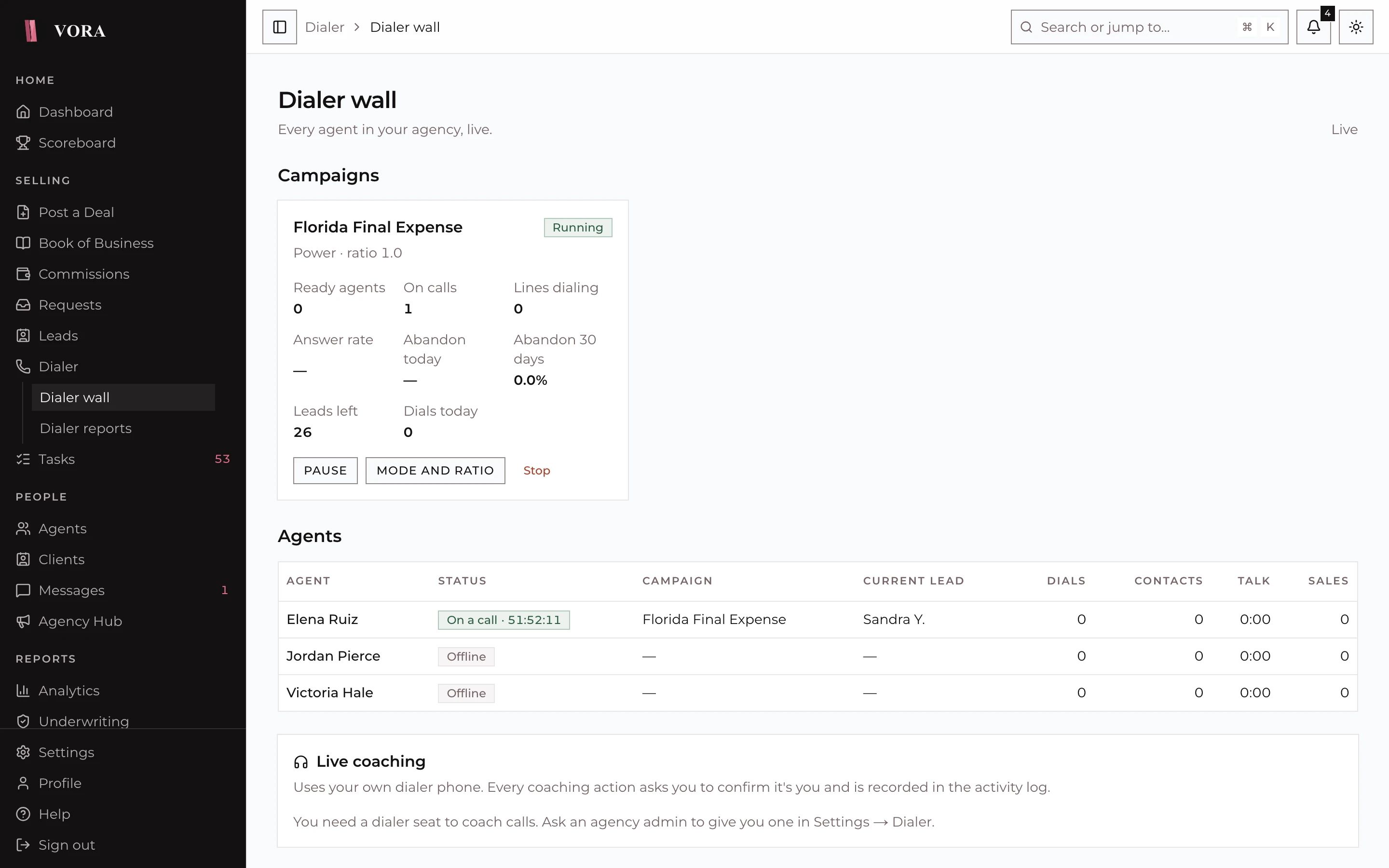
The supervisor wall
Live tiles for every agent and campaign. Supervisors listen, whisper, barge in or take over, and start, pause or stop campaigns from one screen.
- Listen
- Whisper
- Barge in
- Take over
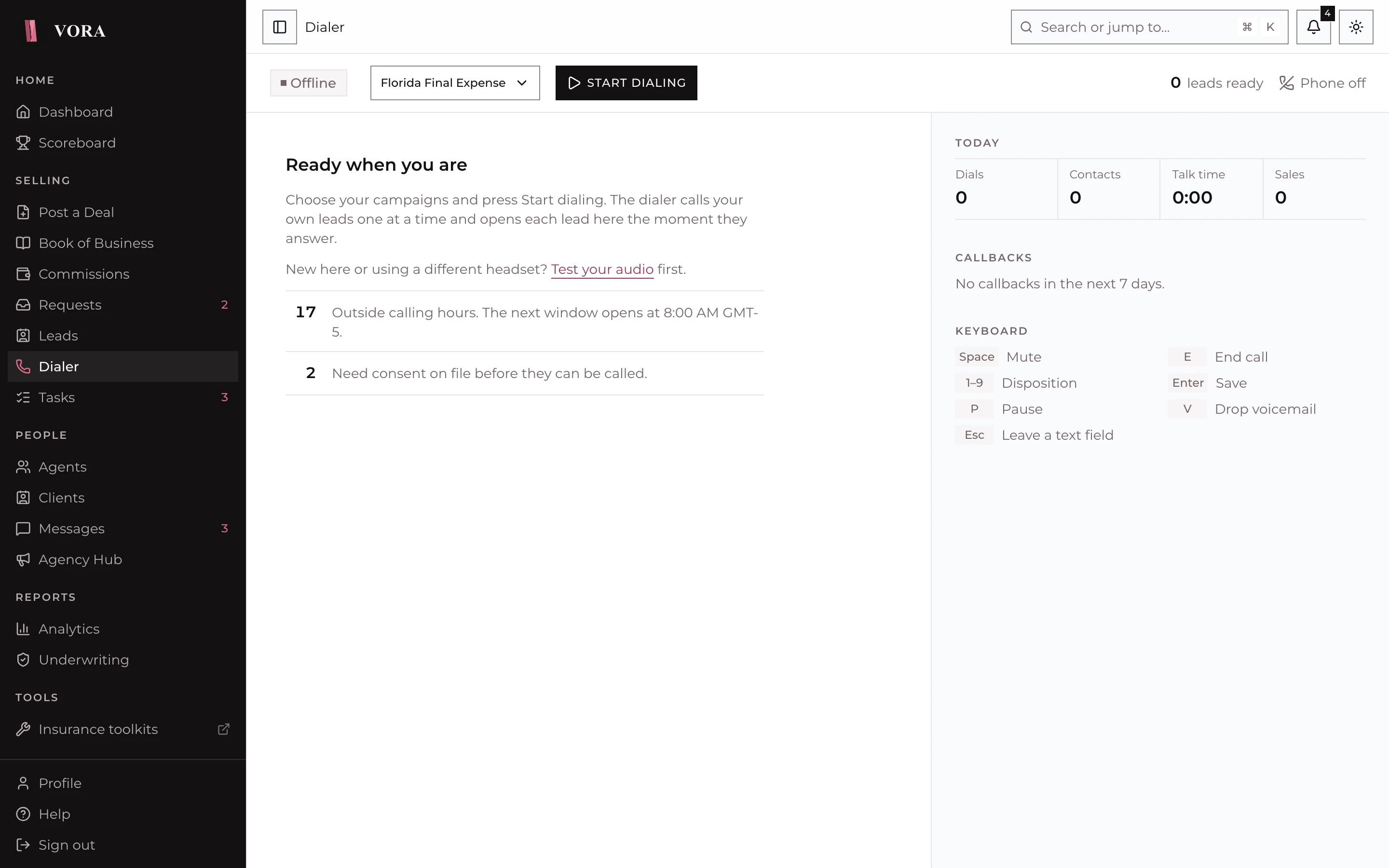
Hands on the keyboard, eyes on the client
The agent's console shows who is held back and why, today's numbers and callbacks. Every action has a key.
- Space
- Mute
- E
- End call
- 1-9
- Disposition
- V
- Drop voicemail
- P
- Pause
- Enter
- Save
A compliant dialer built into the CRM
Preview, power and parallel dialing in the browser, with answering machine detection, voicemail drop, live supervision and the compliance rules life insurance calling requires.
Reports and quality
Dialer reports
Each one exports to CSV
- AgentDials, contacts, talk, wait, wrap-up and paused time, sales and cost, by day or week.CSV
- CampaignAnswer, contact and abandon rates, conversion and cost for each campaign.CSV
- Lead sourcesWhich lead lists and vendors turn into contacts and sales.CSV
- Best timesContact rate by hour and day for each state, in the lead's own time zone.CSV
- ComplianceDropped calls, calls stopped by do not call, consent revocations and machine detection accuracy.CSV
- Number healthCalls and answer rate for each of your caller ID numbers.CSV
Recorded calls can be transcribed and summarised, and admins score them against weighted QA scorecards.
For team leads and managers
Run the floor from one screen
Team leads and managers start, pause and stop campaigns, listen in and coach live from the supervisor wall. Bring your lists and your numbers; we set up the campaigns with you.